Interactive Projectors: Novelty Presentation Devices or Starship Enterprise Worthy Tech?
Standing in front of the room with a laser pointer in one hand and a powerpoint controller in the other can make a presenter feel like Robocop. Ruling the room with influence, technology and capability, well at least in the 90s, maybe. Corporations with forward-thinking employees are always looking to leverage technology to advance their […]


Do interactive projectors fit your presentation style?
Standing in front of the room with a laser pointer in one hand and a powerpoint controller in the other can make a presenter feel like Robocop. Ruling the room with influence, technology and capability, well at least in the 90s, maybe.
Corporations with forward-thinking employees are always looking to leverage technology to advance their message, and appear to be on the “bleeding-edge” of technological implementation.
Presenters are advancing their businesses and themselves using the latest tools to accentuate their messages and stories. If you are traveling to make a sales presentation or pitch a big idea, you are just as concerned with your presentation as you are with executing it. In this regard, often tech has been your enemy. You are managing the transport of projectors, equipment and making sure it functions the same when it arrives as it did in your office.
Projectors are ubiquitous with telling stories. Storytelling should be the focus. The tech that drives it should be secondary, and used as an accent once you’ve got your message squared away. Brands and companies have used projectors to maximize the size of their ideas to large and small audiences alike.
Interactive projectors offer another layer of communication capability, and complexity. While they have been around for a few years their usage has been limited to sophistcated classrooms and for internal communications. The upside of their capabilities and creative potentional are enormous. They allow users to interact with them and face their audience simultaneously. Like an acrobat, engaging with their clients, while manipulating their presentation. The difficulty of bringing one with you is that it lacks portability practicality. These projectors are a niche product and you can’t rely on your host site having one.
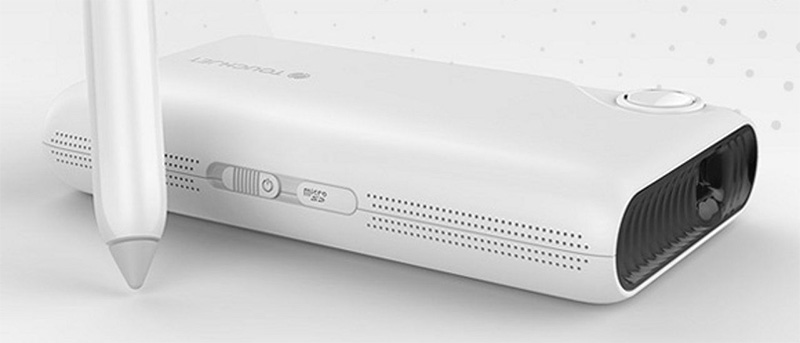 TouchJet, a new interactive projector company has recently released Pond Projector. It’s a self-contained interactive projector built into a housing with an android tablet, speaker and battery. It’s a device smaller than your laptop and is a projector that allows you to play multimedia content.
I’m proposing some reasons to consider incorporating a interactive projector tech into your presentations, including usage tips, benefits, pros and cons, etc.
Making the most out of an interactive project
Why upgrade from my trusty laptop and traditional projector?
We’ve finally graduated from dongle hell and our tech culture has finally settled on HDMI. Why should I consider another way of presenting?
- Traditional laptop and projector setup has interactivity limitations. Interacting with the laptop, you are not engaged content on the projector, let alone your audience.
- If you are using an iPad to control the laptop, or direct to projector, you have a similar issue with being appearing distracted with your devices if you are performing more complex interactivity.
Tips for success with Interactive Projector
- Keep the projector off at first. Introduce yourself and conduct your opener with the lights on.
- Place yourself in the front of the room, standing, facing your audience, run through your introduction, your agenda. Once you complete the opener, turn on the projector and dim the lights.
- Bring a sturdy, carbon-fiber, light-weight collapsible tripod for mounting the portable projector. It is preferable if the tripod can collapse to desktop height for maximum flexibility. You want to avoid a shaky projection during your presentation.
- Portable projectors can run off of batteries. Consider a portable auxiliary battery powered solution for extending the duration of your projector runtime and to take advantage of avoiding running it via the included AC Adapter to your host’s power supply.
- Separate your projector presentation from your presentation opener. Since your projector presentation relies on manipulated the light of the room to allow the presentation to be easily seen on the wall. You’ll want to make sure your audience can see you deliver your confident opener.
- Portable projectors are small enough to have a backup in case something goes wrong.
- Bring a portable projection screen if you are unsure you will have access to one.
- Use Android software to automatically launch your key presentation upon wake from sleep or powerup.
The benefits
- The stylus can interact with the projector by clicking the stylus against the wall or performing a floating click. You can click on an auxiliary button on the pen allowing you to physically further away from the wall if you choose to be.
- You are able to position your shoulders to your audience and interact with the presentation in complex ways other than “Back” and “Forward”.
- You are able to develop presentations more complex than that of a powerpoint. You can build a presentation that is gesture sensitive or enable whiteboard features overtop anything you project.
- Portability. It’s only a couple of pounds and is the size of an ice cream sandwich
- Cost. It is one of the less expensive projectors on the market.
The cons
- The small package means low lumens. If you are not able to control the light in your host room, it will be difficult to see your images, even at maximum brightness.
- People who love their laptops might find it clunky to transition to an Android tablet solution. They run powerpoint.
There are multitudes of other interactive projectors from Epson, BenQ and others that offer similar features. These devices are in larger form factors. There are android phones that offer non-interactive projector capabilities.
It is easy to get overwhelmed with the amount of options in our tech laden culture. Whichever direct you choose, just remember to stick to the contents of your message first.
I’m basing this article on my experience with an interactive android based projector device from TouchJet called “Pond”. I was made aware of it in a Kickstarter campaign in October 2014. At the time it was called TouchPico Projector.