7 ways to improve business proposal design with interactivity
Make Your Business Story Outshine the Competition I want to provide seasoned business development professionals with my best digital design techniques to enhance your next proposal. You have a big business proposal coming up and you want to hit this one out of the park and make a big impact. You have studied the requirements analysis. You […]

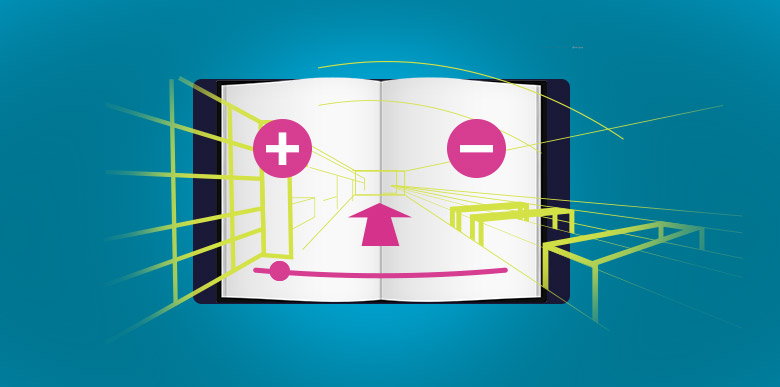
Check out the top 7 ways to enhance your business proposal design using interactive methods on a tablet
Make Your Business Story Outshine the Competition
I want to provide seasoned business development professionals with my best digital design techniques to enhance your next proposal.
You have a big business proposal coming up and you want to hit this one out of the park and make a big impact. You have studied the requirements analysis. You have created a methodology and developed a situation analysis for fulfilling your proposal. You know the client like the back of your hand. You are ready to compose it using traditional methods. But stop for a minute and step back. What is your plan for creating a compelling digital B2B design and delivery mechanism? Is your business going to stand out from the competition?
Sure, you may need to submit a traditional printed and bound proposal. You also could deliver a tablet to make your product or service shine. You may also want to incorporate interactive experiences from a recent trade show design into your presentation.
Ditch the business proposal PPT presentation and leverage tablet interactivity
Tablet hardware prices have come down recently. You can get an android tablet for less than $60
1) Immerse your prospect in a video experience
When you are delivering a first round proposal likely you are not face-to-face with your prospect. This can be frustrating as there is so much you want to communicate. Moreover, the printed word is limiting in conveying your team’s message. Consider creating a well-produced video short to submit along with the proposal. You will be communicating your team’s emotional enthusiasm and energy in a non-traditional format. Your directors and executives have their elevator speeches down. Great news, you are ahead of the game in planning the video production. You already have your video storyboarded. Get them in front of the camera so their voices can convey your brand’s differentiating points. The video will bring emotion to your proposal and faces to enhance your brand persona.

With your business proposal format in video, on a tablet, you are able to convey emotion beyond the printed word
How is this substantiated?
- It’s ideal to capture your compelling story with production professionals. If you are on a razor thin budget you can use the production studio in your pocket, your cell phone.
- I would suggest an approach one step up. Pair a GoPro Camera
with settings in portrait mode and a lavaliere microphone
connected to the external audio input. While your prospect loves seeing your faces, audio clarity is the most important component here. The lav mic will provide you with clarity to get your message across.
- Provide your prospect with the ecosystem to view your produced video. Load your video onto an android tablet. Program the video into the tablet’s memory. Your video can be set to auto play upon tablet activation.
2) Environmental 3d flythrough
Put your prospect in control of your environmental experience with a virtual flythrough. Bringing to life the experience means EVERYTHING to your business, especially for restaurateurs and hoteliers. Showcase it, show it off, and tell the story with the right points-of-view for your prospect to understand. A virtual flythrough allows your prospect to control and absorb your data at their pace.
Prove all business operations angles: queue servicing, consumer stations, signage, and architectural details. Show future plans through 3D rendering, illustration or the current customer experience with photography.
Architects can create high-resolution environmental representations through software programs. A few simple pencil sketches can also tell the story. Decide what rendering fidelity is most applicable for the content you are depicting. With one fell finger swoop on the tablet’s slider bar, content is in the control of the user.
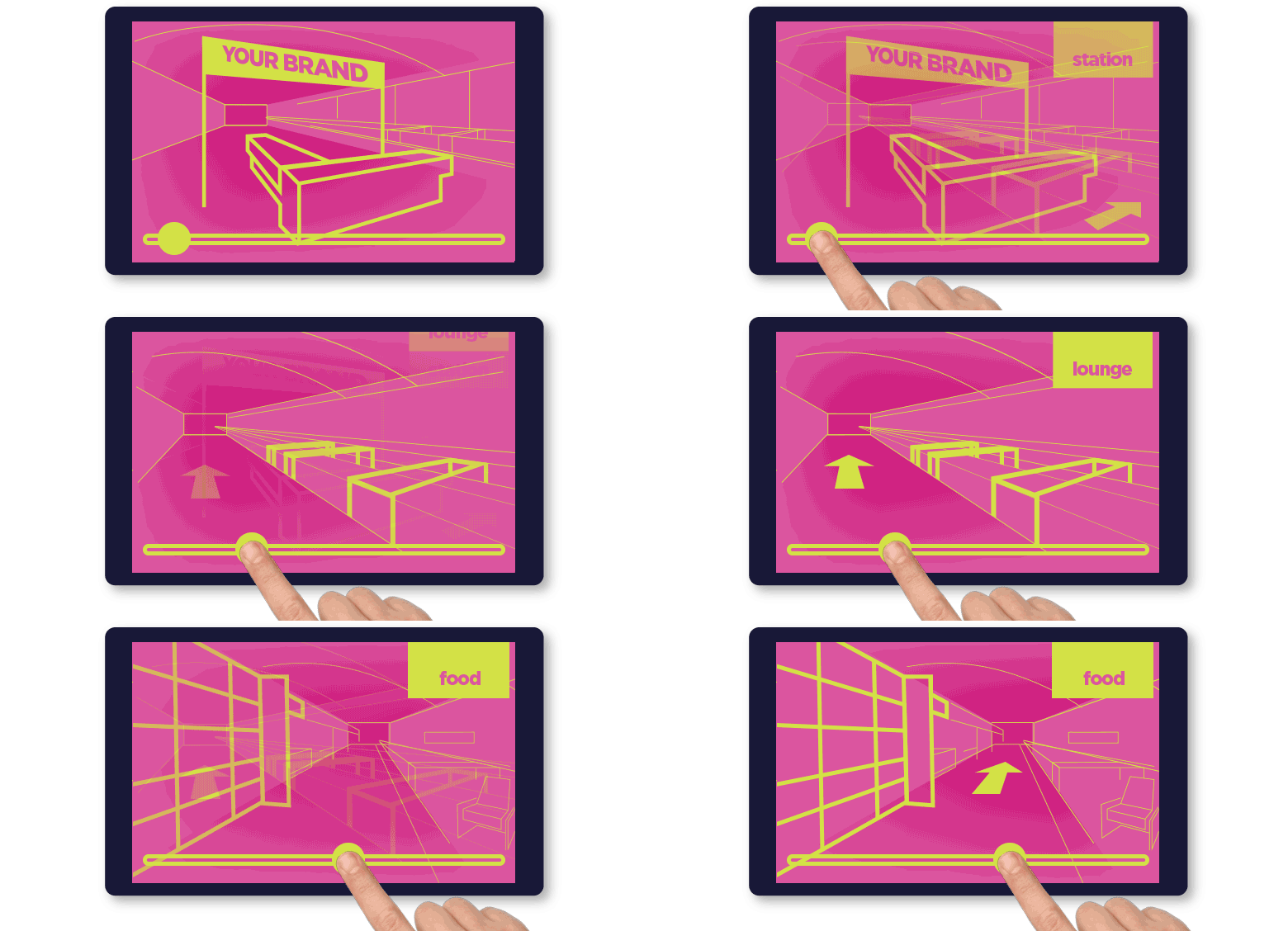
Your prospect can slide the scrubber to reveal key content you want to highlight in your environmental 3d flythrough rendering.
How is this substantiated?
- Are you walking a prospect through a hotel presentation? Create still photos of your experience by taking one photo every 10-20 feet of your experience. Download them and stitch them together on a timeline-based control that is slider manipulated. You could feature many experiences in one slider, overlaid with a unique graphic descriptions. Illustrate to your prospect all the finer points of what they are seeing. You are creating virtual brand immersive for your prospect from the comforts of their office.
- If a rendering is more appropriate for you, work with an architectural firm. Architects use software like Autodesk Maya 2015
to produce life like environmental walkthroughs and other architectural presentation techniques. Autodesk SketchBook Pro 7
is useful in creating basic wireframes. Once they create 3D models, they can provide individual jpg images for you. If the firm provides your graphic designer an HD video rendering, that is also sufficient. The designer can extract individual frames into stills for their timeline scrubber.
3) 3D Product Rotation
Bring your products to life in 3D, using 2D rotated photos. Bringing a product to life in a virtual space is achievable with a rotating 3D experience. You have considered showing various product angles, displaying them sequentially or on multiple pages in your printed proposal. But this can be cumbersome and there is a better way. Create a slider on a tablet to manipulate and create a virtual product rotating experience. Your prospect will experience your product and it multi-faceted features.
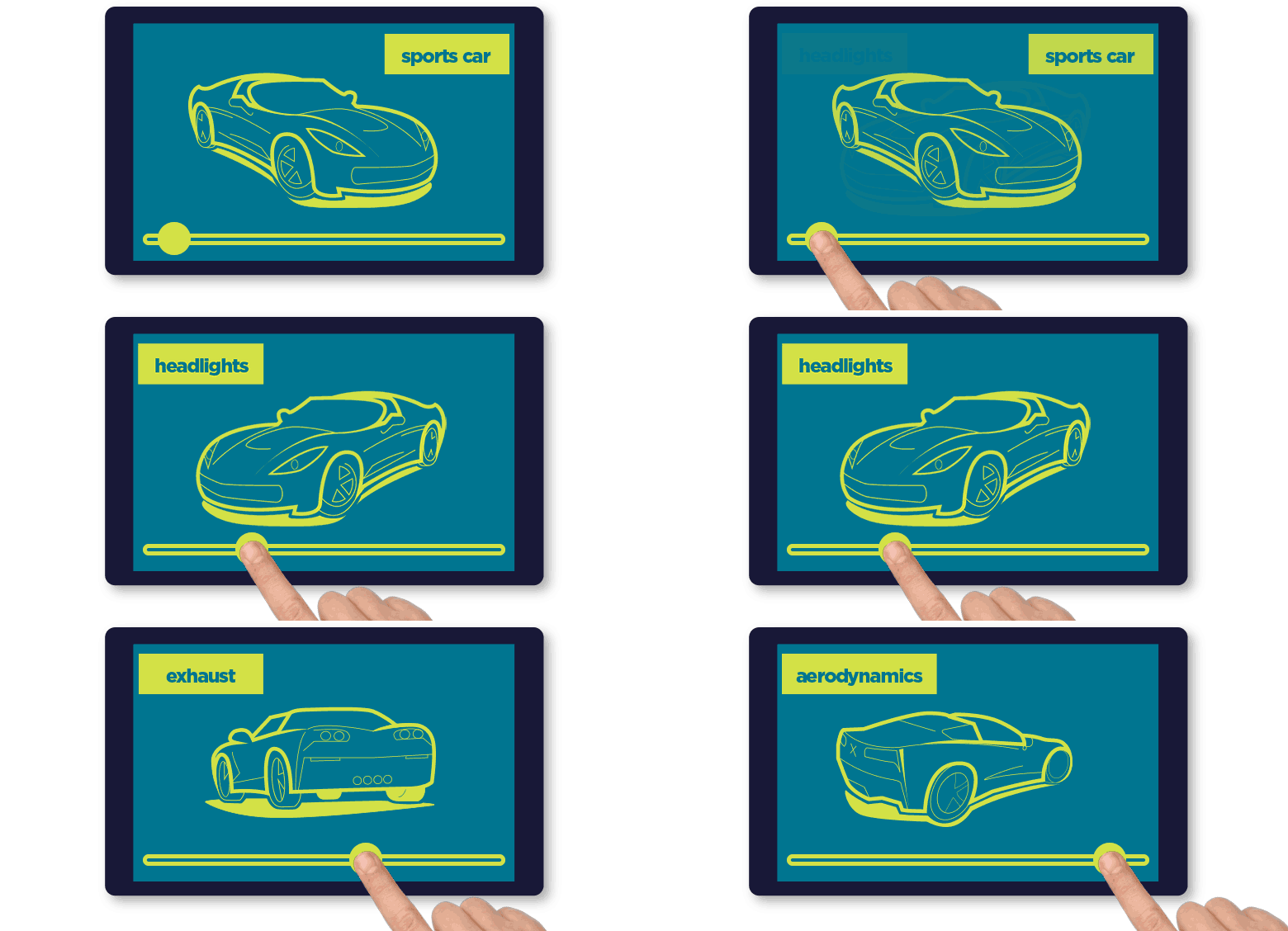
3D product rotation and interaction design allows your prospect to experience key areas of your offering
How is this substantiated?
- Correct production to create the images using photography is paramount. Use flat table surface that rotates and a camera tripod. Keep the camera stationary, rotate the product about 10 or 15 degrees, capture the photo and repeat. You can stitch these visually together with one scrubber position equalling one rotation frame
- Graphically overlay call out descriptions to explain your product features from various points of view
- Alternatively, if your project is virtual or not yet developed you could contract out 3D renderings or illustrations. Either method will encourage product engagement
- Make sure you use icons to cue your prospect that they can interact and manipulate the rotating visual
4) Digital overlay hotspots
Tablets encourage engagement on even the most fundamental of visual experiences. Hotspot icons overtop still photographs or illustrations invite interaction.
You could present your prospect with a simple, clean graphic chart that shows the basics of your business plan. The chart could include pulsing animated hotspots that invite the viewer to tap to find out more information. Think of them as portals into visual deep-diving. This technique is great for static images. The digital screen is more interactive than flipping through pages. You are turning your prospect into an active participant engaged with your data.
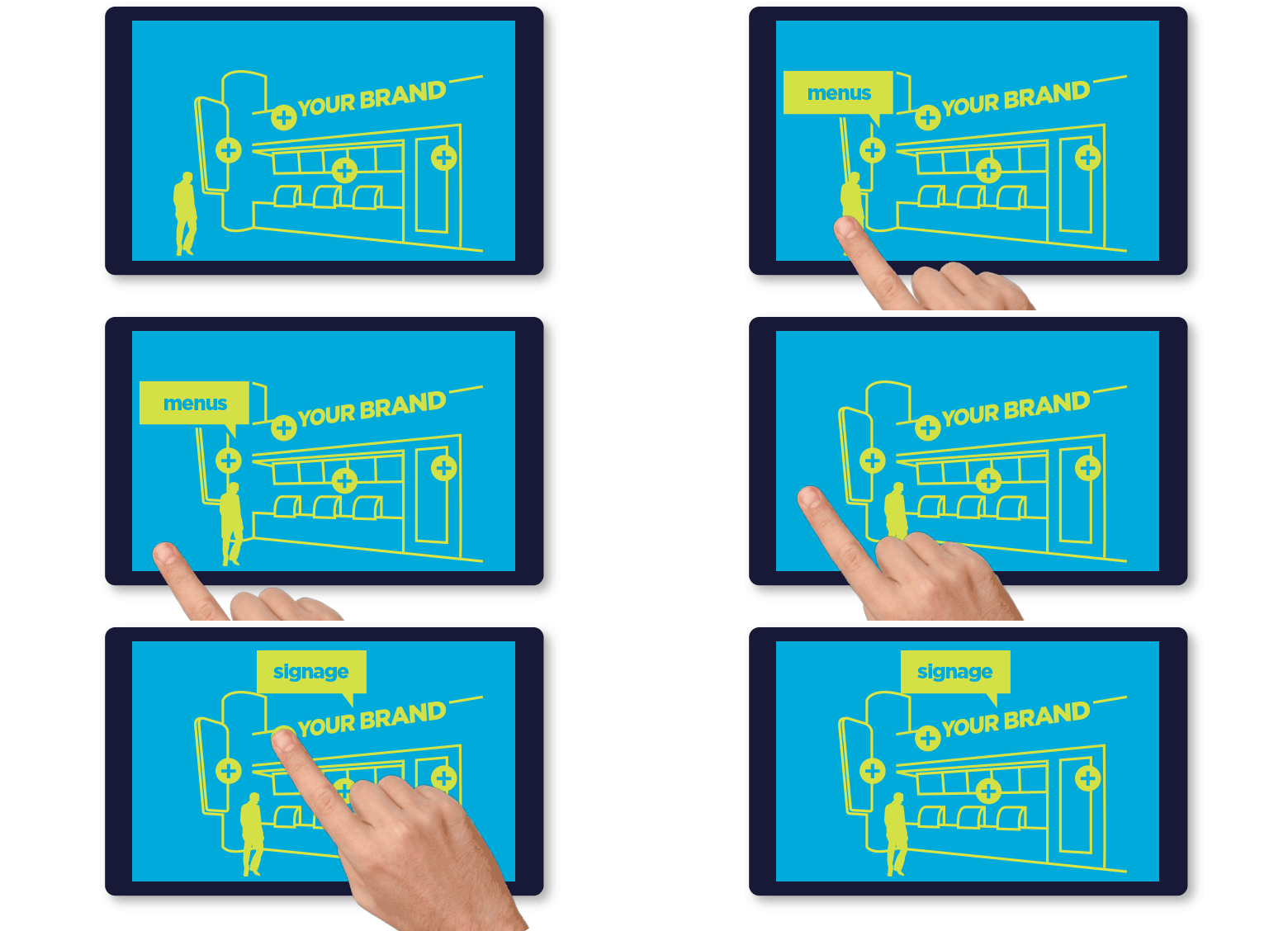
Interactive hotspots encourage your prospect to tap. More information can be revealed when they interact, creating brand engagement
How is this substantiated?
- Create a chart, illustration or photo containing hotspots. Use contrasting icon colors queuing your prospect to the notion of hidden data available
- Important: Make sure you including the ability for the user to return back to the original, “home” view of your chart
5) Sliding infographic design
You are familiar with inforgraphics and their power to compel and communicate. Shortcomings in print design do not exist on digital proposal tablets. Tablets free you from the confines and limitations of paper. No need to scale to fit graphics on an 8.5×11” paper sheet or clumsy fold out. Consider your small tablet as a portable portal to a long linear story. Tell your brand’s story through elongated illustrations and design.
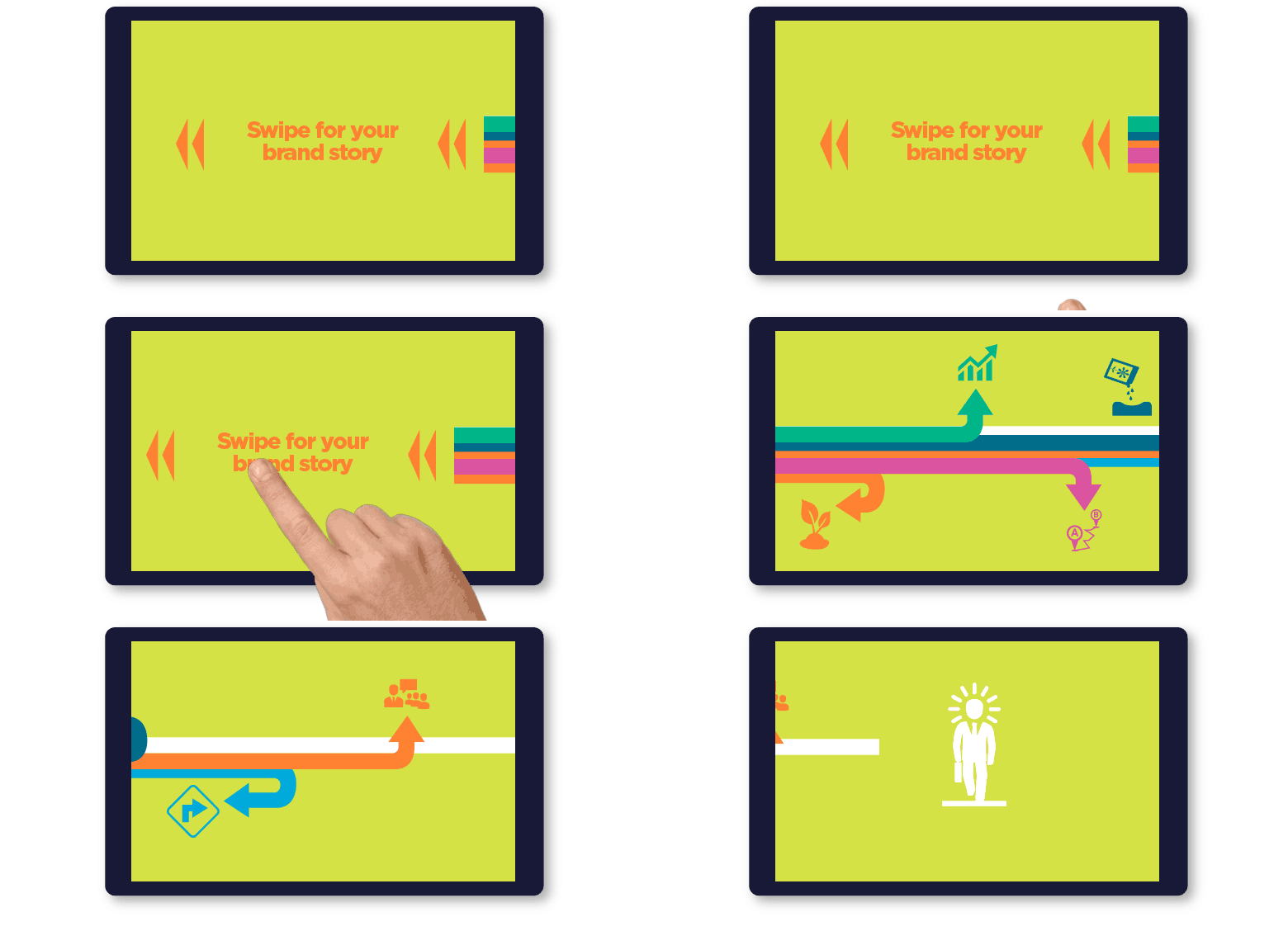
Sliding infographic design shows your clients and prospects complex information in a visual format that can scroll on an on.
Consider this:
- Create quality infographics that tell your story use visuals to communicate your brand’s vision
- Create vertical or horizontal designed infographics that are long like a linear story
- Create hotspot overlays within your scrolling graphic. As your prospect slides the graphic sideways, they can pause throughout to dive into more information on key areas
- Interactivity creates engagement, engagement persuades
6) Navigation bar
Like the tabs on your printed business proposal, your prospect needs a way to get from one visual element to the next.
Are you using many digital presentation techniques listed in this post? You will need a way for the prospect to explore them. Design a navigation system, like you would see on a webpage. Allow prospects to find their way throughout the great interactive content you developed.
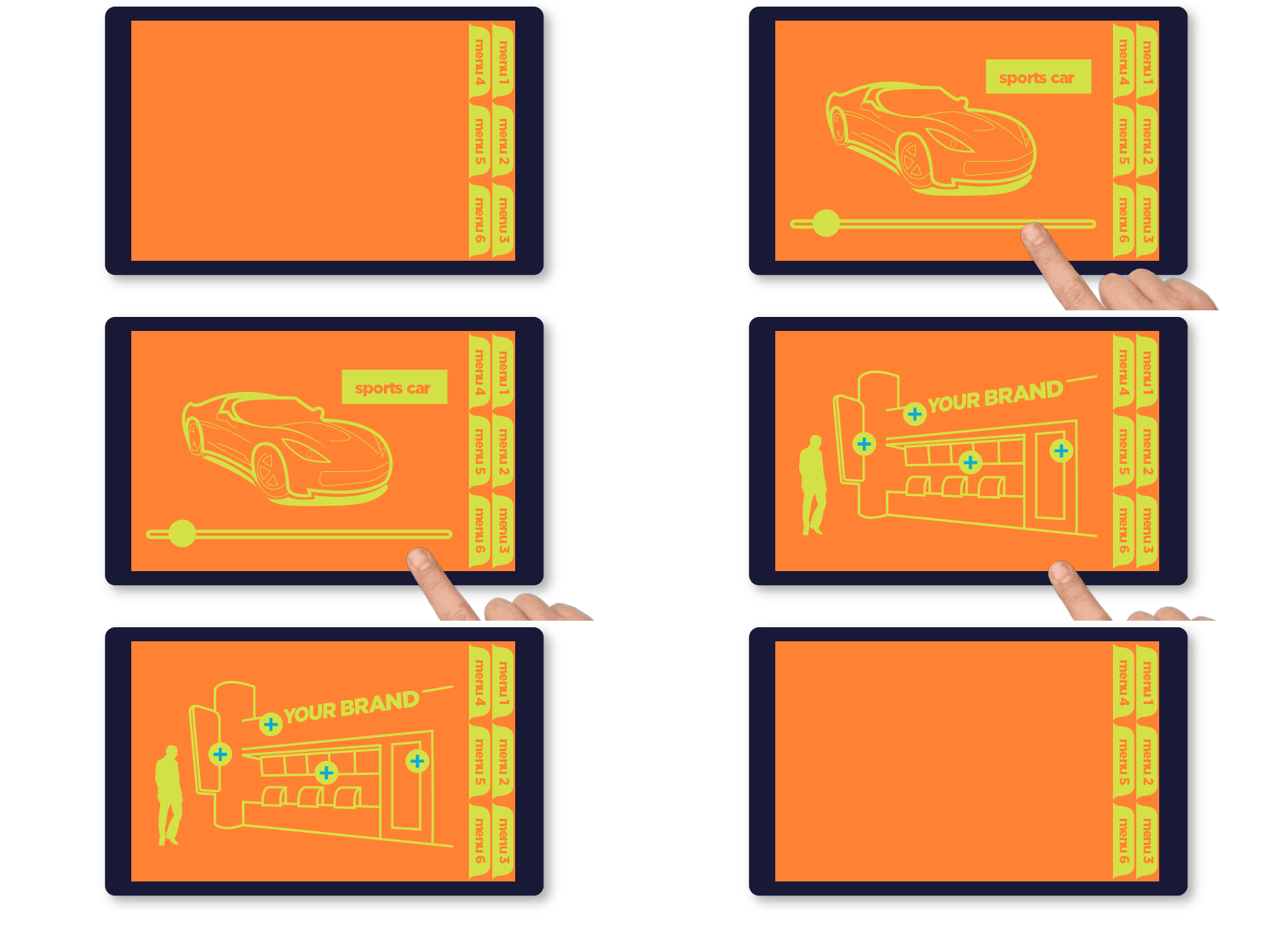
Consider this:
- Keep the navigation simple. Avoid drop down menus. Avoid spacing navigation items too close together. Avoid unnecessary complexity especially for an older audiences
- Consider a “home” button to restart the presentation
- Use a 12 point font or larger. Consider a larger font for older audiences
- Your printed proposal should be telling the story with words. Your digital tablet story is visually experienced. Keep text content to a minimum
- Consider a navigation that is parallel to your printed proposal. If there are six tabs on your printed proposal, then use six tabs on your tablet, with relevant digital content
7) Animated GIFs
You see these self-playing animated images all over the web. Many are a visual plague and create noise, others create memes that go viral. For your digital business proposal they are animations, when used tastefully and careful, catch the eye. You can use these to create looped animations that stand alone or nested into the techniques we recently discussed.
What can you do with animated GIFs?
- Use looped GIFs to show business operational mechanics
- Show how queued customers getting serviced
- Animated graphics can display the complex bar charts and infographic growth
- GIFs can simulate the digital menu board motion, adding visual interest to restaurant signage
- You can show how visitors can navigate to their destination through wayfinding signage
Delivering the digital business proposal design
Now that you are considering delivering a tablet along with a printed proposal there are additional considerations to make your tactics work together.
- Be certain you are understanding your prospects needs with content fulfillment and professional design
- Visually family the tablet with the printed proposal
- Skin the tablet in a custom branded wrapper. Use temporary or permanent graphics that make it coordinate with the printed piece
- Less is more, especially with digital content. You won’t want to overload the viewer. Consider the demographic you are reaching
- Consider creating a custom direct mail box to harness both the tablet and the proposal sheets
- Coordinate the communications. Design a graphic theme using similar colors, fonts and brand messages
- Make using the tablet foolproof. Leverage auto start programs and tablet action keys. No matter what key the prospect presses, make your presentations appear
- Consider creating a binder that combines the digital tablet juxtaposed to your printed proposal
- Think offline. Turn off the wifi, to create a closed-circuit experience. Load your presentation into HTML5 files along with all the supporting content. Doing this creates an environment that you can completely control
- Completely charge your digital device before sending it to your prospect. Send it in a timely fashion. Expect that after a few weeks the tablet could be completely drained. Provide a charging cable.
- Think of the tablet as a branded premium leave-behind, as opposed to a gift.
Signup for email updates. You’ll want to stay tuned as I’ll be posting the 10 steps you need to take to create a flawless business proposals on Android tablets.
When you signup, you’ll need to confirm your email address in the email you’ll receive.
[yks-mailchimp-list id=”73fdd1db62″ submit_text=”Subscribe Now”]